






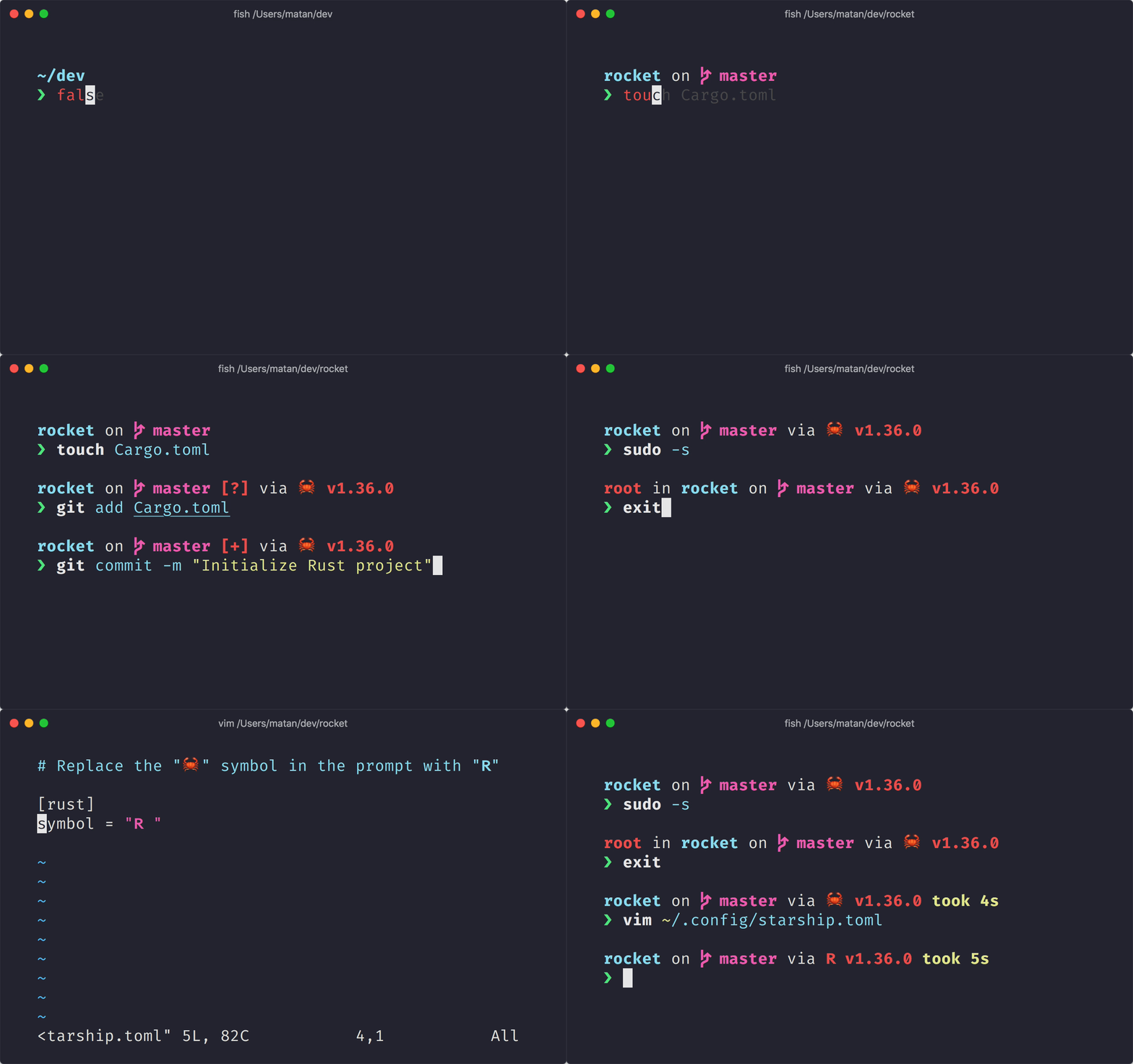
 **適合任何 shell 的最小、極速、無限客製化的提示字元!**
- **快:**很快 —— 非常非常快! 🚀
- **可客製化:**全方面定制你的提示字元。
- **通用:**適用於任何 Shell 以及作業系統。
- **智能:**一目了然地顯示相關信息。
- **豐富的功能:**支援所以有你喜歡的工具。
- **易用:**安裝快速 —— 幾分鐘內就可以開始使用。
## 🚀 安裝
### 先決要求
- 安裝至少一個 [Nerd Font](https://www.nerdfonts.com/) 字體,並在終端中啟用(例如,你可以試試 [Fira Code Nerd Font](https://www.nerdfonts.com/font-downloads))。
### 入門
**備註:**由於不同平台的數量眾多,下方僅顯示部分已支持平台。 找不到你正在使用的平台? 我想你可以來[額外平台說明](https://starship.rs/installing/)看看。
1. 安裝 **starship** 執行檔:
#### 安裝最新版本
##### 從預構建的二進制包,並且使用 Shell 命令:
```sh
sh -c "$(curl -fsSL https://starship.rs/install.sh)"
```
如果想更新已安裝的 Starship,請重新執行上述指令。 指令只會更新 Starship 執行檔本身,不會影響到任何已撰寫的設定檔。
**備註** —— 安裝腳本的預設值可以被覆蓋,請使用以下指令查看內置說明。
```sh
sh -c "$(curl -fsSL https://starship.rs/install.sh)" -- --help
```
#### 使用套件管理器安裝:
##### 使用 [Homebrew](https://brew.sh/):
```sh
brew install starship
```
##### 使用 [Scoop](https://scoop.sh):
```powershell
scoop install starship
```
2. 將初始化腳本 (script) 加入你的 shell 的設定檔:
#### Bash
將以下內容放到 `~/.bashrc` 的結尾:
```sh
# ~/.bashrc
eval "$(starship init bash)"
```
#### Fish
將以下內容放到 `~/.config/fish/config.fish` 的結尾:
```sh
# ~/.config/fish/config.fish
starship init fish | source
```
#### Zsh
將以下內容放到 `~/.zshrc` 的結尾:
```sh
# ~/.zshrc
eval "$(starship init zsh)"
```
#### PowerShell
將以下內容放到 `Microsoft.PowerShell_profile.ps1` 的結尾。 你可以藉由在 PowerShell 查詢 `$PROFILE` 變數以取得這個檔案的位置。 一般來說,檔案會出現在 `~\Documents\PowerShell\Microsoft.PowerShell_profile.ps1`,若是在 -Nix 上,檔案則會出現在 `~/.config/powershell/Microsoft.PowerShell_profile.ps1`。
```powershell
Invoke-Expression (&starship init powershell)
```
#### Ion
將以下內容放到 `~/.config/ion/initrc` 的結尾:
```sh
# ~/.config/ion/initrc
eval $(starship init ion)
```
#### Elvish
**注意** 只支援 elvish v0.15 以上的版本。 將以下內容放到 `~/.elvish/rc.elv` 的結尾:
```sh
# ~/.elvish/rc.elv
eval (starship init elvish)
```
#### Tcsh
將以下內容放到 `~/.tcshrc` 的結尾:
```sh
# ~/.tcshrc
eval `starship init tcsh`
```
#### Xonsh
將以下內容加到 `~/.xonshrc` 的結尾:
```sh
# ~/.xonshrc
execx($(starship init xonsh))
```
#### Nushell
**警告:**此處設定在未來可能有所變動。 只支援 nu v0.33 以上的版本。 將以下內容放到 Nushell 設定檔的結尾。 你可以透過在 nu 執行 `config path` 指令來取得設定檔的位置。
```toml
startup = [
"mkdir ~/.cache/starship",
"starship init nu | save ~/.cache/starship/init.nu",
"source ~/.cache/starship/init.nu"
]
prompt = "starship_prompt"
```
## 🤝 貢獻
我們歡迎具有**各式各樣能力**的貢獻者! 如果你正在尋找容易加入的方法,試試看標註為「[good first issue](https://github.com/starship/starship/labels/🌱%20good%20first%20issue)」的 issue。
如果您精通非英語語言,並能協助我們在文檔上的翻譯保持最新狀態,我們會非常感謝! 如果你想要提供翻譯,可以到 [Starship Crowdin](https://translate.starship.rs/) 上提交您的翻譯。
如果你對貢獻 Starship 有興趣,請看我們的 [貢獻指南](https://github.com/starship/starship/blob/master/CONTRIBUTING.md) 。 另外,請不用客氣加入我們的 [Discord 伺服器](https://discord.gg/8Jzqu3T) 並來問候一下。 👋
### 專案貢獻者
感謝所有做出貢獻的人,使這個專案能夠存在。 [[我要貢獻](https://github.com/starship/starship/blob/master/CONTRIBUTING.md)]
**適合任何 shell 的最小、極速、無限客製化的提示字元!**
- **快:**很快 —— 非常非常快! 🚀
- **可客製化:**全方面定制你的提示字元。
- **通用:**適用於任何 Shell 以及作業系統。
- **智能:**一目了然地顯示相關信息。
- **豐富的功能:**支援所以有你喜歡的工具。
- **易用:**安裝快速 —— 幾分鐘內就可以開始使用。
## 🚀 安裝
### 先決要求
- 安裝至少一個 [Nerd Font](https://www.nerdfonts.com/) 字體,並在終端中啟用(例如,你可以試試 [Fira Code Nerd Font](https://www.nerdfonts.com/font-downloads))。
### 入門
**備註:**由於不同平台的數量眾多,下方僅顯示部分已支持平台。 找不到你正在使用的平台? 我想你可以來[額外平台說明](https://starship.rs/installing/)看看。
1. 安裝 **starship** 執行檔:
#### 安裝最新版本
##### 從預構建的二進制包,並且使用 Shell 命令:
```sh
sh -c "$(curl -fsSL https://starship.rs/install.sh)"
```
如果想更新已安裝的 Starship,請重新執行上述指令。 指令只會更新 Starship 執行檔本身,不會影響到任何已撰寫的設定檔。
**備註** —— 安裝腳本的預設值可以被覆蓋,請使用以下指令查看內置說明。
```sh
sh -c "$(curl -fsSL https://starship.rs/install.sh)" -- --help
```
#### 使用套件管理器安裝:
##### 使用 [Homebrew](https://brew.sh/):
```sh
brew install starship
```
##### 使用 [Scoop](https://scoop.sh):
```powershell
scoop install starship
```
2. 將初始化腳本 (script) 加入你的 shell 的設定檔:
#### Bash
將以下內容放到 `~/.bashrc` 的結尾:
```sh
# ~/.bashrc
eval "$(starship init bash)"
```
#### Fish
將以下內容放到 `~/.config/fish/config.fish` 的結尾:
```sh
# ~/.config/fish/config.fish
starship init fish | source
```
#### Zsh
將以下內容放到 `~/.zshrc` 的結尾:
```sh
# ~/.zshrc
eval "$(starship init zsh)"
```
#### PowerShell
將以下內容放到 `Microsoft.PowerShell_profile.ps1` 的結尾。 你可以藉由在 PowerShell 查詢 `$PROFILE` 變數以取得這個檔案的位置。 一般來說,檔案會出現在 `~\Documents\PowerShell\Microsoft.PowerShell_profile.ps1`,若是在 -Nix 上,檔案則會出現在 `~/.config/powershell/Microsoft.PowerShell_profile.ps1`。
```powershell
Invoke-Expression (&starship init powershell)
```
#### Ion
將以下內容放到 `~/.config/ion/initrc` 的結尾:
```sh
# ~/.config/ion/initrc
eval $(starship init ion)
```
#### Elvish
**注意** 只支援 elvish v0.15 以上的版本。 將以下內容放到 `~/.elvish/rc.elv` 的結尾:
```sh
# ~/.elvish/rc.elv
eval (starship init elvish)
```
#### Tcsh
將以下內容放到 `~/.tcshrc` 的結尾:
```sh
# ~/.tcshrc
eval `starship init tcsh`
```
#### Xonsh
將以下內容加到 `~/.xonshrc` 的結尾:
```sh
# ~/.xonshrc
execx($(starship init xonsh))
```
#### Nushell
**警告:**此處設定在未來可能有所變動。 只支援 nu v0.33 以上的版本。 將以下內容放到 Nushell 設定檔的結尾。 你可以透過在 nu 執行 `config path` 指令來取得設定檔的位置。
```toml
startup = [
"mkdir ~/.cache/starship",
"starship init nu | save ~/.cache/starship/init.nu",
"source ~/.cache/starship/init.nu"
]
prompt = "starship_prompt"
```
## 🤝 貢獻
我們歡迎具有**各式各樣能力**的貢獻者! 如果你正在尋找容易加入的方法,試試看標註為「[good first issue](https://github.com/starship/starship/labels/🌱%20good%20first%20issue)」的 issue。
如果您精通非英語語言,並能協助我們在文檔上的翻譯保持最新狀態,我們會非常感謝! 如果你想要提供翻譯,可以到 [Starship Crowdin](https://translate.starship.rs/) 上提交您的翻譯。
如果你對貢獻 Starship 有興趣,請看我們的 [貢獻指南](https://github.com/starship/starship/blob/master/CONTRIBUTING.md) 。 另外,請不用客氣加入我們的 [Discord 伺服器](https://discord.gg/8Jzqu3T) 並來問候一下。 👋
### 專案貢獻者
感謝所有做出貢獻的人,使這個專案能夠存在。 [[我要貢獻](https://github.com/starship/starship/blob/master/CONTRIBUTING.md)]
 ### 專案資助者
成為專案資助者,推動社群永續經營 [[成為贊助者](https://opencollective.com/starship/contribute)]
#### 個人
### 專案資助者
成為專案資助者,推動社群永續經營 [[成為贊助者](https://opencollective.com/starship/contribute)]
#### 個人
 #### 組織
以組織名義資助專案 這裏會產生一個能連向您組織網站的連結標誌。 [[成為贊助組織](https://opencollective.com/starship/contribute)]
#### 組織
以組織名義資助專案 這裏會產生一個能連向您組織網站的連結標誌。 [[成為贊助組織](https://opencollective.com/starship/contribute)]








 ## 💭 發想來自
請看之前這些幫助我們創造 Starship 的前任作品。 🙏
- **[denysdovhan/spaceship-prompt](https://github.com/denysdovhan/spaceship-prompt)** - 給太空人的 ZSH 提示。
- **[denysdovhan/robbyrussell-node](https://github.com/denysdovhan/robbyrussell-node)** - 使用 Javascript 撰寫的跨 shell robbyrussell 主題。
- **[reujab/silver](https://github.com/reujab/silver)** - 一個跨 shell、可客製化、像 powerline 的圖案提示字元。
## 💭 發想來自
請看之前這些幫助我們創造 Starship 的前任作品。 🙏
- **[denysdovhan/spaceship-prompt](https://github.com/denysdovhan/spaceship-prompt)** - 給太空人的 ZSH 提示。
- **[denysdovhan/robbyrussell-node](https://github.com/denysdovhan/robbyrussell-node)** - 使用 Javascript 撰寫的跨 shell robbyrussell 主題。
- **[reujab/silver](https://github.com/reujab/silver)** - 一個跨 shell、可客製化、像 powerline 的圖案提示字元。